A mic stand holds your microphone in a usable position so you can speak comfortably instead of managing equipment during a recording. The right choice depends on your recording space, your microphone's weight, and whether you sit, stand, or move between locations. This guide helps Indian podcasters and creators, including Hindi-speaking hosts, compare stand styles, check compatibility, and build a practical setup for recording.
Which Mic Stand Is Right for Your Recording Setup?
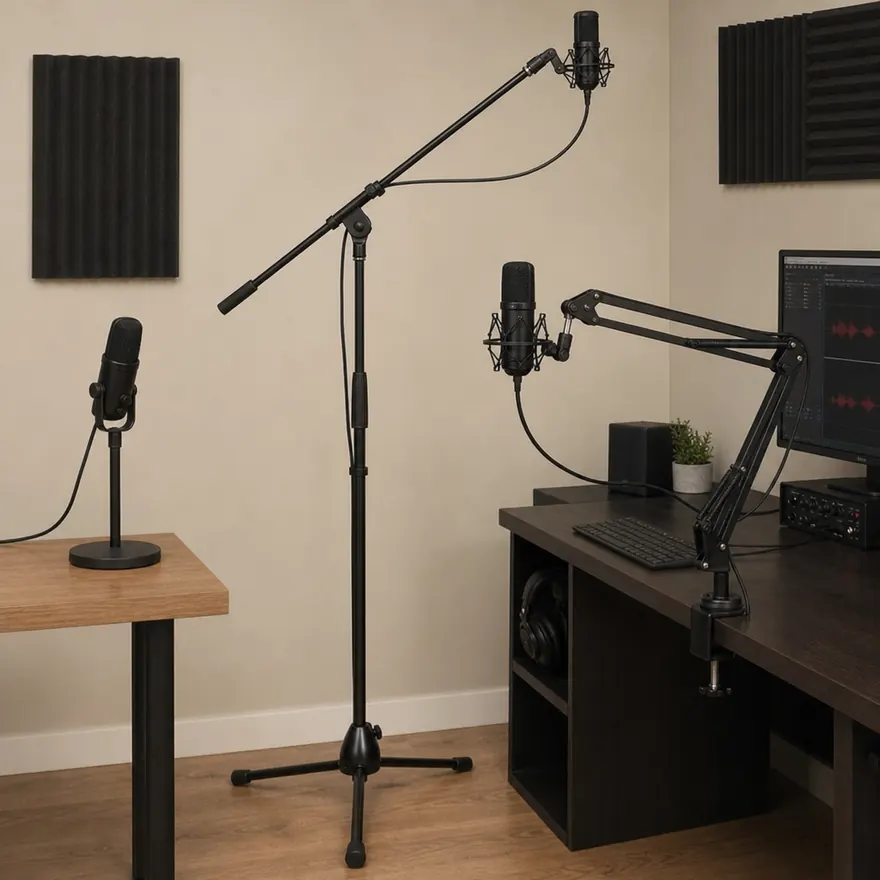
Choose a desktop boom arm for adjustable positioning at a regular workstation. Pick a floor boom stand when you need reach without attaching anything to your desk, or a straight mic stand when the microphone can sit directly above its base. Start with where your mouth will be during recording, then choose the support that reaches that spot without making you lean forward. RØDE's podcast setup guide suggests a compact desktop stand for smaller setups and a studio arm for longer-term setups with more space.
Before shopping, sit or stand exactly as you would during an episode. Open your script, position your camera, and leave room for your keyboard or notebook. Measure the gap between a possible mounting point and your preferred microphone position rather than guessing from product photos.
Use this shortlist to narrow your search:
- Solo desk recording: Consider an adjustable desktop arm if you want to move the microphone around a screen or script.
- Standing narration: Look at a floor stand whose height range suits your normal posture.
- Recording away from home: Prioritize a folding design and check its packed size.
- A temporary tabletop setup: Consider a compact weighted stand, as long as it raises the microphone high enough.
Treat these as starting points, not automatic purchases. Your microphone and available mounting surface should decide the final choice. If you haven't picked a microphone yet, start with our guide to the best podcast mic in India, since the mic's size and weight shape which stand will work.
Straight Stands, Floor Booms, and Desktop Arms Compared
Straight Stands Keep Positioning Simple
A straight mic stand places the microphone on top of a vertical shaft instead of extending it sideways on a boom. Desktop versions often offer adjustable height with a weighted base, while floor-standing designs suit a different working height. For a seated podcast, check the height range carefully. A compact tabletop model may still leave the microphone below your speaking position.
Choose this style when you can place the base exactly where it needs to go. During your layout test, make sure that spot doesn't compete with your notes, laptop, or hands. Simplicity only helps if it suits how you record.
Floor Boom Stands Add Reach
A boom mic stand adds an arm that lets you position the microphone away from the vertical support. A collapsible tripod model such as the Samson MK10 pairs that flexibility with a base that folds up for transport. This style is worth considering when you want a separate floor support rather than a desk attachment.
Before choosing one, mark out where the legs would sit beside your chair. Rehearse sitting down, standing up, and reaching for your notes. Reject any arrangement that puts the legs in your walking path.
Desktop Arms Suit Adjustable Workstations
An articulating desktop arm attaches to a surface and lets you change the microphone's position through its joints. Some models include both a removable clamp and a more permanent mounting option. Check the mounting method, reach, and supported weight together. A long arm isn't useful if it can't attach securely to your desk.
What to Check Before Buying a Microphone Stand
Check the complete mounted weight, usable reach, mounting surface, and microphone connection before buying a microphone stand. Together, these decide whether the stand can hold your equipment and place it correctly. Review the specifications for your exact model, not a similar-looking product from the same brand.
Count the Complete Mounted Setup
Include the microphone, mic holder or shock mount, and any accessories the arm will carry. Don't compare the stand's stated capacity with the microphone alone. Also check whether the manufacturer lists different limits at different extensions.
If you are comparing telescoping boom arms from different brands, note the exact model number first. Specifications vary between models in the same range, so confirm Indian seller availability and support for the specific model you choose.
Match the Mounting Hardware
Before ordering, check your microphone, stand, and mounting accessories as one system. Confirm that the stand's threaded fitting matches your microphone mount, or identify the correct adapter. Some arms come with adapters, but don't assume every stand includes one.
Also know the difference between a clip and a shock mount. A shock mount suspends the microphone to help isolate vibration and handling noise, while a basic holder mainly provides attachment. Choose based on your microphone's needs and the noise you deal with, not because an accessory looks professional.
Inspect Your Desk Before Choosing a Clamp
Measure the desk edge and check underneath for obstructions. Compare the usable surface with the arm's maximum clamp opening, and follow its installation instructions. If you are considering a drilled mounting option, test your preferred microphone position with a removable setup first.
Practical Mic Stand Options Sold in India
Two Samson models are useful starting points for different recording layouts. Both are listed by Indian retailers, but confirm stock, delivery to your PIN code, warranty terms, and the exact package before ordering.
- Samson MK10 (floor boom stand)
- Why consider it: A lightweight steel boom stand with a collapsible tripod base and an included microphone clip.
- Check before ordering: Make sure it suits your complete microphone setup and the floor space you have.
- Samson MBA38 (desktop boom arm)
- Why consider it: An articulating arm with up to 38 inches of reach and both C-clamp and flange mounts included, according to Samson's MBA38 page.
- Check before ordering: Compare its reach, clamp opening, and weight capacity with your workstation and microphone.
The MK10 is the better starting point if portability and floor placement matter most. The MBA38 is worth comparing if you record at a desk regularly and want adjustable reach. These are layout-based suggestions, not a claim that either is best for every microphone or creator.
How to Position Your Microphone for Comfortable Recording
Position the microphone so you can speak toward its pickup area while keeping a relaxed posture. Check whether it is an end-address or side-address design, then experiment with distance and a slight angle to reduce breath blasts. A pop filter can help with plosives, and a suitable shock mount can reduce vibration reaching the microphone. For more on matching placement to mic type, see our USB podcast mic guide.
If you record in Hindi, test with the language and delivery you actually use. Read part of your Hindi introduction, switch into English if that is normal for your show, and rehearse an animated passage. Judge the setup on your real performance, not an unusually careful test voice.
Before each session:
- Set your posture first. Put your chair, script, and screen where you want them.
- Bring the microphone into position. Avoid arranging the equipment around an uncomfortable lean.
- Check the cable route. Follow the stand's cable-management instructions and leave slack where you need to move.
- Record a rehearsal. Include normal speech, laughter, and typical hand movements.
- Listen back. Investigate pops, rumble, and distracting background noise before continuing.
Make the Stand Part of Your Recording Routine
Choose for the space and microphone you have, then test the complete arrangement before upgrading anything else. Keep a note or photo of the position that works for you. Repeat that setup at your next session and adjust only what needs changing.
For remote conversations, Zencastr's recording tools record each participant on a separate track. Pair your stand checks with a short test recording before inviting your next guest.
Ready to put your setup to work? Visit Zencastr and start your next podcast recording.