A collar mic is a small, wearable microphone that keeps speech capture close to your mouth without putting a large microphone in the frame. For Indian podcasters and creators recording in Hindi, English, or both, the best choice starts with your device, recording location, and number of speakers, not the longest feature list. This guide explains what to prioritize, suggests options available through Indian sales channels, and shows you how to test your setup before recording.
What Makes a Collar Mic Right for Your Podcast?
The right collar mic connects reliably to your recording device, stays securely attached to your clothing, and captures intelligible speech during your normal movements. A lapel or lavalier microphone is another name for this wearable format. It can connect through a cable or form part of a wireless system. Placement and compatibility deserve as much attention as the microphone itself.
Start by describing a typical episode. Are you delivering a Hindi monologue at home, interviewing a guest across a table, or filming conversations while walking? Use that scenario to decide what you actually need, instead of buying for an imaginary future studio. If you are still deciding between a clip-on mic and a desk microphone, our guide to the best podcast mic in India compares the main types.
Write down these requirements before comparing products:
- Recording device: Your exact phone, laptop, camera, or recorder model, including its available audio connections.
- Speaker count: One presenter, two people together, or guests joining remotely.
- Movement: Seated delivery, demonstrations, or walking shots.
- Environment: A quiet room, a reflective indoor space, or an outdoor location.
- Workflow: Audio-only episodes, video podcasts, short clips, or a combination.
Treat this as your shopping brief. If a feature does not solve one of these needs, rank it below compatibility and dependable everyday operation.
Wired vs Wireless Collar Mic Setups
A wired collar clip mic connects physically to your device, while a wireless system sends audio from a wearable transmitter to a receiver. Some wireless transmitters contain their own microphone, so there is no separate lavalier cable to route through clothing. A compact clip-on unit and a traditional wired lavalier can therefore look quite different while serving similar purposes.
For seated solo recording, consider a wired setup first. Check whether its cable comfortably reaches your device and whether you can turn, gesture, and read notes without pulling the microphone. The Sennheiser XS Lav USB-C, for example, has a two-meter cable and is designed for dialogue recording with mobile devices and computers.
For demonstrations or conversations involving movement, consider wireless. Check how the receiver connects, how many transmitters the kit includes, and how you will recharge everything between sessions. The RØDE Wireless Micro smartphone kit includes two clip-on transmitters and a charging case, which makes it a candidate for a mobile two-person workflow. Our wireless podcast microphone guide covers wireless kits in more depth.
Neither format wins automatically. Choose the setup that removes the most friction from the recordings you make regularly.
Will It Work With Your Phone or Laptop?
A microphone will work only when its output, your device's input, and the recording software all support the connection. Matching the physical plug is not always enough. 3.5 mm TRS and TRRS connections have different wiring requirements, and the wrong combination can leave you without usable audio. Check the complete connection path before ordering adapters.
For USB-C equipment, look for explicit device and operating-system compatibility instead of assuming every USB-C accessory behaves the same way. Sennheiser positions the XS Lav USB-C for mobile devices and computers, while RØDE offers separate USB-C and Lightning versions of its Wireless Micro smartphone receiver. Buy the version intended for your equipment.
Use this checklist when speaking to a seller:
- Confirm the exact microphone model and connector version shown on the invoice.
- Ask whether your specific phone or computer is supported.
- Identify every required cable or adapter before purchasing.
- Check whether the receiver fits with your phone case attached.
- Establish how you will connect headphones during recording.
- Read the return conditions before opening or testing the product.
Do not leave the first compatibility check until a guest is waiting. Make a short recording with the actual device and software you intend to use.
Two Collar Mic Options to Shortlist in India
These options have an official Indian product presence or appear in an Indian distributor's catalog. They suit different workflows and are not a universal ranking. Confirm stock, seller authorization, warranty coverage, and the exact package before buying.
Sennheiser XS Lav USB-C for Seated Solo Recording
The Sennheiser XS Lav USB-C is an omnidirectional, wired lapel microphone listed on Sennheiser's Indian website. It includes a clip, removable foam windscreen, storage pouch, and two-meter cable. Consider it for solo podcasts, voice-overs, or direct-to-camera explanations when a wired connection suits your working space.
Before choosing it, check cable reach with your usual seating arrangement. Put your phone or laptop where it will actually sit, then rehearse your normal movements. If you repeatedly need to stand or step away, reconsider whether a wired setup fits your format.
RØDE Wireless Micro for Smartphone Conversations
The RØDE Wireless Micro appears in the catalog of RØDE's Indian distributor. Its smartphone kit provides two transmitters with built-in microphones, a plug-in receiver, and a charging case, and USB-C and Lightning versions are available. Its GainAssist feature automatically manages audio levels, which helps when you want fewer manual adjustments.
Shortlist it for mobile video podcasts or two-person interviews. Verify how your chosen recording software handles both speakers before committing to an episode. Do not assume that two microphones automatically mean two independently editable tracks in every application. For more interview-specific picks, see our guide to the best mic for interviews.
Placement Matters More Than Hiding the Microphone
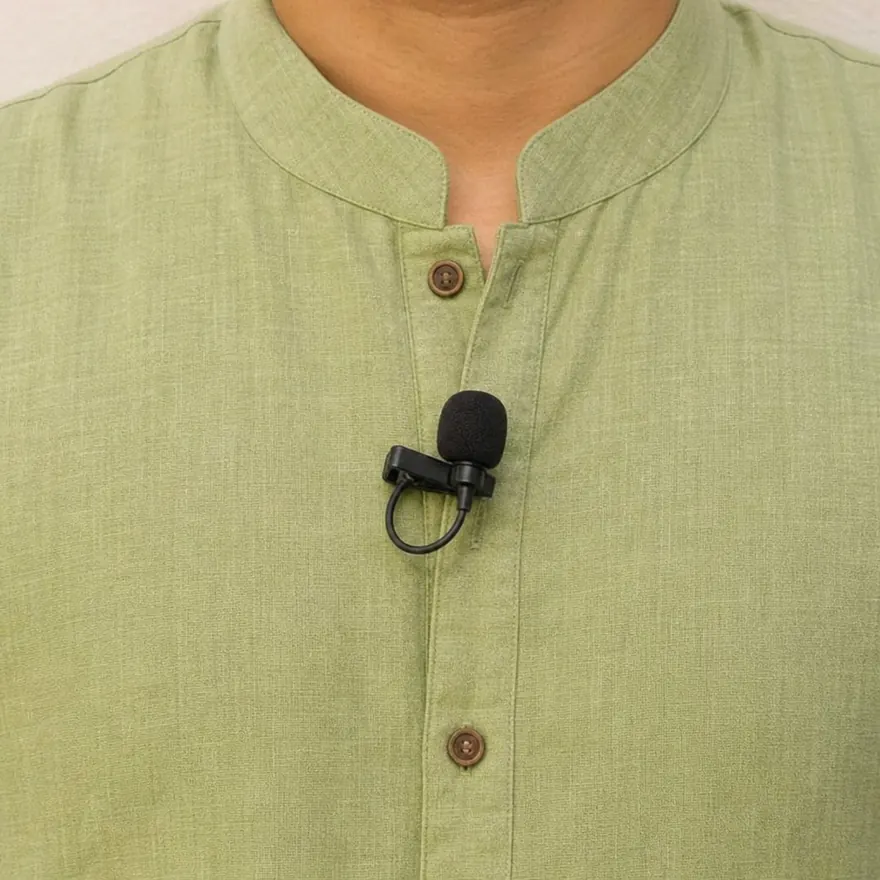
Position a lavalier near the upper chest, with the capsule clear of rubbing fabric. RØDE recommends roughly 20–30 centimeters from the mouth as a useful placement range and cautions against positioning it directly beneath the neck. Use that as a starting point, then listen and adjust for your clothing and voice.
For recordings in a kurta, collared shirt, sari, or dupatta, rehearse the gestures you normally make. Check whether jewelry, fabric folds, or a moving scarf touches the capsule. With a wired microphone, secure the cable and leave a small strain-relief loop so that each movement does not tug directly on the clip.
Also listen to the room before blaming the microphone. Choose a quieter position away from obvious noise sources, and favor a space with fewer hard, reflective surfaces. Curtains, carpets, and other soft furnishings can help reduce reflections, although they do not make a room soundproof.
How Should You Test a Collar Mic Before an Episode?
Test the microphone with your actual device, clothing, recording software, and speaking style, then listen back through headphones. Include ordinary speech, louder moments, and movement, instead of only checking that a level meter responds. Monitoring and sensible input levels help reveal noise or distortion before the full recording starts.
For a Hindi or Hinglish podcast, try this rehearsal:
- Use real material. Read your introduction, then speak naturally without a script.
- Change intensity. Include an enthusiastic sentence and a laugh, and listen for harsh distortion.
- Move normally. Turn toward your guest, gesture, and adjust your posture to expose clothing noise.
- Pause briefly. Listen for fan hum, traffic, and other background distractions.
- Check every speaker. Record both people and confirm that each voice is usable.
- Play back the saved file. Assess the recording itself, not just the sound you heard during setup.
Change one thing at a time when troubleshooting. Adjust placement, repeat the same passage, and compare before changing levels or moving rooms.
Connect Your Collar Mic to a Remote Recording Workflow
Zencastr is a remote podcast recording platform available to creators in India, including Hindi-speaking creators. It records participants locally and provides separate participant tracks, which can help when editing a conversation recorded from different locations. Zencastr's recording FAQs strongly recommend headphones to reduce echo and audio bleed.
Before inviting a guest, check Zencastr's current device and browser requirements and run a complete rehearsal with your chosen microphone. Ask guests to check their own input and use headphones too. A successful equipment test should cover the whole conversation workflow, not just your side of it.
Choose a compatible microphone, make placement repeatable, and listen before every session. Start with the simplest setup that meets your needs, then upgrade when a specific limitation appears.
Ready to record your next conversation? Explore Zencastr and start building your remote podcast workflow.